
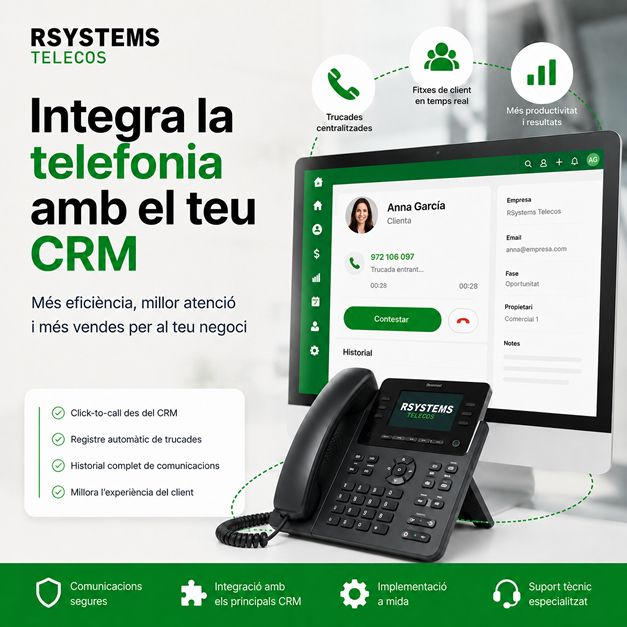
How to integrate your company’s telephony with CRM
In many companies, phone calls continue to operate as a separate channel from the rest of the digital tools. A customer calls, someone answers, notes are taken on paper or in an email, and then someone tries to remember what was discussed, who handled it, and what follow-up is required. This system may work when there are only a few calls, but as the company grows it becomes a source of information loss.
Integrating company telephony with CRM connects calls with sales management, customer service, and internal processes. This helps better record each interaction, identify customers, follow up on opportunities, and reduce manual tasks.
A good telephony and CRM integration can make a significant difference for companies with sales teams, technical support, administration, customer service, or recurring services.
What does integrating telephony with CRM mean?
Integrating telephony with CRM means connecting the company’s phone system with the platform used to manage customers, contacts, opportunities, incidents, or sales tasks.
This can allow the system to automatically identify a customer when a call comes in, register a call within the contact record, make calls directly from the CRM, or create follow-up tasks after a conversation.
The goal is for telephony to stop being an isolated tool and become part of the company’s real workflow.
Why is it useful for a business?
When telephony and CRM are not connected, a lot of information can be lost along the way. A call may only exist in the memory of the person who answered it. If that person does not record the information correctly or follow up, the opportunity may be lost.
With a properly designed integration, the company can achieve better traceability, greater control, and an improved customer experience.
Better sales follow-up
Sales teams can see who called, when the call took place, which customer is behind it, and what follow-up actions are needed. This helps prevent missed opportunities and improves the organization of the sales process.
More professional customer service
When a call comes in and the system displays the customer record, the person answering can have more context: contact details, history, open issues, previous conversations, or commercial status.
This creates a more professional image and avoids making customers repeat information.
Less manual work
Manually recording calls, copying notes, opening records, or searching for customers can consume a lot of time. CRM integration with telephony helps automate part of this process and reduce errors.
More activity control
The company can have a clearer view of incoming, outgoing, missed, or pending calls. This is useful for management, sales managers, support teams, or administration departments.
Common features of a telephony and CRM integration
Every company may need a different integration depending on the CRM it uses, its phone system, call types, and internal processes. However, there are some very common features.
Automatic customer identification
When a call comes in, the system can search the number in the CRM and display the corresponding customer or contact record. This allows employees to know who is calling before the conversation begins.
This feature is very useful for customer service teams, sales representatives, or technical support.
Automatic call logging
Calls can be recorded within the customer record, including information such as date, time, number, duration, or the person who answered the call.
This makes it easier to review communication history and gain a more complete view of the customer relationship.
Click-to-call
Click-to-call allows users to make a call directly from the CRM by clicking on the contact’s phone number. This avoids manually entering numbers and greatly speeds up the work of sales and administrative teams.
Creation of follow-up tasks
After a call, the system can help create a task, reminder, or pending action. For example, calling back, sending a proposal, reviewing an issue, or following up on an opportunity.
Linking calls to sales opportunities
In sales environments, a call can be associated with a specific opportunity. Integrating telephony and CRM helps keep conversations recorded within the sales process.
Virtual PBX and CRM: a powerful combination
SIP virtual PBXs already allow companies to manage extensions, queues, voice prompts, schedules, call forwarding, and mobility. When these features are connected to CRM, telephony becomes even more valuable.
For example, a call entering through a sales queue can be associated with a customer; a missed call can generate a task; or a call made from the CRM can be automatically recorded.
This helps connect the technical side of telephony with the commercial and management side of the company.
Which departments can benefit?
Telephony and CRM integration is not only for large companies. It can also be highly useful for SMEs and businesses that manage recurring customer relationships.
Sales teams
They can call directly from the CRM, record interactions, review customer history, and follow up on opportunities with greater control.
Customer service
They can identify callers, view previous issues or inquiries, and provide faster, more contextualized responses.
Administration
It can manage calls related to invoices, documentation, orders, or internal inquiries with greater traceability.
Technical support
It can link calls with incidents, customers, equipment, or contracted services, improving service continuity.
Common issues when telephony and CRM are not connected
When each tool operates separately, many small issues can appear that eventually affect service quality and productivity.
- Calls that are not recorded.
- Customers having to explain the same information multiple times.
- Sales opportunities without follow-up.
- Notes scattered across emails, papers, or internal documents.
- Difficulty knowing who handled a call.
- Loss of information when a person is unavailable.
- Lack of an overall view of telephone activity.
What should be considered before integrating telephony and CRM?
Before implementing an integration, it is important to review how the company actually works. Not all businesses need the same level of integration or the same type of automation.
Which CRM does the company use?
The first step is identifying which CRM or management tool is used: it could be a sales CRM, ERP, custom web application, or internal software.
How does the phone system work?
It is necessary to review whether the company uses a SIP virtual PBX, IP telephony, extensions, queues, recordings, reports, or other features that can be connected.
Which processes need improvement?
The goal is not to integrate simply for the sake of integrating. It is necessary to identify what needs improvement: call logging, sales follow-up, customer service, incidents, automation, or internal control.
Who will use the integration?
The solution must be designed for the people who will use it every day. Sales, administration, support, and management teams may have different requirements.
CRM and telephony integrations with RSystems Telecos
At RSystems Telecos, we help businesses connect their telephony systems with CRM, ERP, or management software. We review the phone system, current tools, internal processes, and the team’s real needs.
The goal is for every call to provide useful information and for the company to work with greater control, less manual effort, and better follow-up.
You can find more information about this service on our CRM and telephony integrations for businesses page.
Would you like to connect your telephony with your CRM?
If your company receives sales calls, customer inquiries, or support requests and you want greater control over every interaction, we can help you evaluate an integration adapted to your system.
Contact RSystems Telecos and tell us which tools you currently use.


