
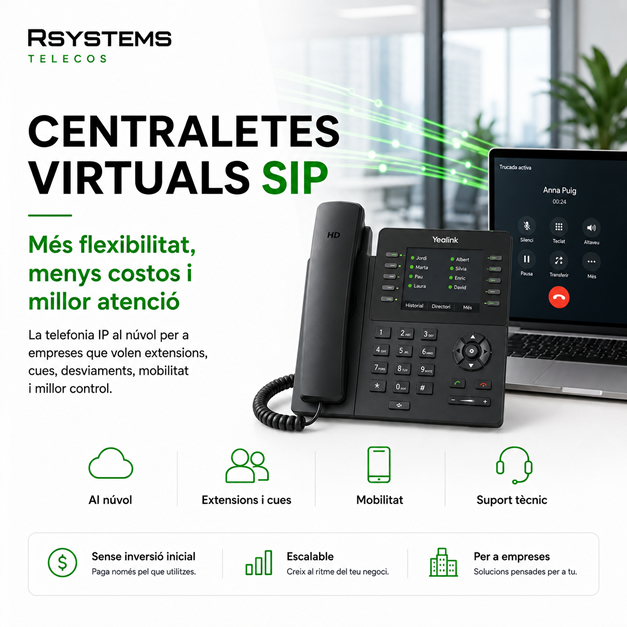
What Is a SIP Virtual PBX and Why Is It Better for Businesses?
The way businesses manage phone calls has changed significantly in recent years. In the past, it was common to have a physical PBX installed in the office, with limitations, maintenance costs, and little flexibility. Today, many businesses already use a SIP virtual PBX, a cloud-based IP telephony solution that makes it possible to manage calls, extensions, queues, voice prompts, and call forwarding in a much more flexible way.
For freelancers, SMEs, and businesses with sales, administrative, technical, or customer service teams, a virtual PBX can provide a major improvement in organization, professional image, and communication management.
What Exactly Is a SIP Virtual PBX?
A SIP virtual PBX is a business phone system that operates over the internet and does not rely on a traditional physical PBX installed at the company. Calls are managed using IP technology, allowing businesses to use IP phones, computers, mobile applications, or softphones to make and receive calls.
Unlike a traditional PBX, a virtual PBX can be configured and expanded much more easily. Extensions can be created, business hours defined, voice prompts activated, call queues configured, call forwarding set up, or multiple offices connected without making major physical changes to the installation.
Benefits of a SIP Virtual PBX for Businesses
A SIP virtual PBX does much more than simply answer calls. When properly configured, it becomes a powerful communication management tool for the business.
Internal Extensions for Every Person or Department
Each user, team, or department can have its own extension. This makes it easier to transfer calls, organize telephone support, and prevent all calls from always reaching the same destination.
For example, a business can have separate extensions for administration, sales, technical support, warehouse, or management. This creates a much more professional image while reducing internal interruptions.
Call Queues to Avoid Missing Opportunities
One of the most valuable features of a SIP virtual PBX is its call queues. When multiple calls arrive simultaneously, the system can keep customers on hold, distribute calls among different employees, and prevent a single line from becoming overloaded.
This is especially useful for businesses that receive a high volume of sales calls, customer inquiries, or support requests.
Voice Prompts and IVR Menus
A virtual PBX also allows businesses to configure professional voice prompts and automated menus. For example: “Press 1 for Administration, Press 2 for Sales, Press 3 for Technical Support.”
This type of configuration helps organize incoming calls more efficiently while projecting a more professional image, even for small businesses.
Call Forwarding and Business Hours
The PBX can be adapted to the company’s actual business hours. Business schedules, holidays, after-hours messages, and automatic call forwarding to other extensions, mobile phones, or voicemail boxes can all be configured.
This ensures the business is not dependent on a single person or a single physical phone to answer important calls.
Mobility and Remote Work
A SIP virtual PBX is especially useful for businesses with employees who work outside the office, sales teams, field technicians, or remote workers.
Using a softphone or mobile application, users can make and receive business calls from anywhere as if they were connected directly to the company’s phone system. This greatly improves service continuity and team flexibility.
SIP Virtual PBX or Traditional PBX?
The main difference is flexibility. A traditional PBX typically depends on physical hardware, more rigid configurations, and less agile expansion. By contrast, a SIP virtual PBX allows businesses to grow and adapt much more easily.
If a company hires new employees, opens a new office, needs another call queue, or wants to add a new voice prompt, a virtual PBX makes these changes much faster and more scalable.
Less Dependence on Physical Hardware
There is no need to maintain a complex physical PBX inside the business. IP phones, softphones, and an internet connection are the primary components required for professional IP telephony.
Greater Control and Configuration
A virtual PBX allows businesses to adjust business hours, extensions, permissions, call forwarding, voicemail boxes, and many other features according to their specific operational needs.
Better Scalability for Business Growth
A company can start with just a few extensions and expand the system as it grows. It can also connect multiple offices or teams without having to redesign the entire telephone infrastructure.
What Types of Businesses Benefit from a SIP Virtual PBX?
A SIP virtual PBX is suitable for many types of businesses, especially those that need to manage calls in an organized and professional manner.
Offices and Service Businesses
Administrative firms, accounting offices, business consultancies, real estate agencies, and professional service providers can significantly improve their telephone service with properly configured extensions, queues, and business hours.
Retail Businesses and Customer Service Operations
Businesses that receive customer inquiries, reservations, orders, or recurring requests can reduce missed calls and provide a more organized customer experience.
Businesses with Multiple Locations
A virtual PBX allows different branches, offices, or work locations to operate under a single telephone system.
Sales Teams and Mobile Technicians
When part of the team works outside the office, IP telephony makes it easy to maintain professional communications without relying solely on personal mobile phones.
Common Features of a SIP Virtual PBX
Every business has different requirements, but these are some of the most common features:
- Internal extensions for users or departments.
- Call queues for more efficient call distribution.
- Welcome messages and after-hours voice prompts.
- IVR menus for directing incoming calls.
- Call forwarding to mobile phones or other extensions.
- Voicemail.
- Business hours, holiday schedules, and special configurations.
- Professional IP phones.
- Softphones for computers or mobile devices.
- Call recording and reporting options based on business needs.
The Importance of Proper Technical Configuration
Implementing a SIP virtual PBX involves much more than simply activating a service. To ensure it performs effectively, it is essential to understand how the business operates, who answers incoming calls, how departments are organized, what business hours apply, how calls should be distributed, and what should happen when no one is available to answer.
Poor configuration can lead to missed calls, inefficient call queues, confusing forwarding rules, or an unprofessional customer experience. That is why it is important to work with a technical team that designs the solution and configures the PBX according to the company’s day-to-day operational needs.
SIP Virtual PBXs with RSystems Telecos
At RSystems Telecos, we help businesses implement SIP virtual PBXs tailored to their specific needs. We assess the current setup, prepare the proposal, configure extensions, call queues, voice prompts, business hours, call forwarding, IP phones, and mobility options.
Our goal is to make your company’s telephony clearer, more flexible, and easier to manage. A well-designed virtual PBX not only reduces complexity but also improves customer service and helps your team work more efficiently.
You can learn more about this service on our SIP virtual PBXs for businesses page.
Looking to Improve Your Company’s Telephone System?
If your business is still using an outdated PBX, inflexible phone lines, or a telephone system that no longer meets your daily operational needs, it may be the right time to consider a SIP virtual PBX.
At RSystems Telecos, we can help you assess your current setup and recommend a solution tailored to your business, including technical configuration, support, and ongoing assistance.
Contact RSystems Telecos and tell us what you need.


